LayoutControl
Base class for visual controls that participate in page layout.
LayoutControl extends Control with common visual layout
capabilities, including:
- explicit sizing (
width,height,aspect_ratio); - absolute positioning (
left, [top],right,bottom); - parent-space placement (
align,margin); - 2D transforms (
rotate,scale,offset,flip,transform); - implicit animations for those properties (
animate_*); - layout/animation lifecycle events (
on_size_change,on_animation_end).
Use LayoutControl as the base for custom visual controls rendered on
the page surface. For popup controls, use DialogControl;
for non-visual integrations, use Service.
Inherits: Control
Properties
-
align(Alignment | None) –Alignment of the control within its parent.
-
animate_align(AnimationValue | None) –Enables implicit animation of the
alignproperty. -
animate_margin(AnimationValue | None) –Enables implicit animation of the
marginproperty. -
animate_offset(AnimationValue | None) –Enables implicit animation of the
offsetproperty. -
animate_opacity(AnimationValue | None) –Enables implicit animation of the
opacityproperty. -
animate_position(AnimationValue | None) – -
animate_rotation(AnimationValue | None) –Enables implicit animation of the
rotateproperty. -
animate_scale(AnimationValue | None) –Enables implicit animation of the
scaleproperty. -
animate_size(AnimationValue | None) –TBD
-
aspect_ratio(Number | None) –The aspect ratio of the control.
-
bottom(Number | None) –The distance that the child's bottom edge is inset from the bottom of the stack.
-
flip(Flip | None) –Flips this control horizontally and/or vertically.
-
height(Number | None) –Imposed Control height in virtual pixels.
-
left(Number | None) –The distance that the child's left edge is inset from the left of the stack.
-
margin(MarginValue | None) –Sets the margin of the control.
-
offset(OffsetValue | None) –Applies a translation transformation before painting the control.
-
right(Number | None) –The distance that the child's right edge is inset from the right of the stack.
-
rotate(RotateValue | None) –Transforms this control using a rotation around its center.
-
scale(ScaleValue | None) –Scales this control along the 2D plane. Default scale factor is
1.0, meaning no-scale. -
size_change_interval(int) –Sampling interval in milliseconds for
on_size_changeevent. -
top(Number | None) –The distance that the child's top edge is inset from the top of the stack.
-
transform(Transform | None) –Applies a generic matrix transform to this control.
-
width(Number | None) –Imposed Control width in virtual pixels.
Events
-
on_animation_end(ControlEventHandler[LayoutControl] | None) –Called when animation completes.
-
on_size_change(EventHandler[LayoutSizeChangeEvent[LayoutControl]] | None) –Called when the size of this control changes.
Examples#
Flip#
import flet as ft


def main(page: ft.Page):
    page.horizontal_alignment = ft.CrossAxisAlignment.CENTER
    page.spacing = 20

    def toggle_x(e: ft.Event[ft.Button]):
        card.flip.flip_x = not card.flip.flip_x
        page.update()

    def toggle_y(e: ft.Event[ft.Button]):
        card.flip.flip_y = not card.flip.flip_y
        page.update()

    page.add(
        card := ft.Container(
            width=220,
            height=120,
            bgcolor=ft.Colors.BLUE_300,
            border_radius=16,
            alignment=ft.Alignment.CENTER,
            content=ft.Text("Flip me", size=24, weight=ft.FontWeight.BOLD),
            flip=ft.Flip(
                flip_x=False,
                flip_y=False,
                origin=ft.Offset(110, 60),
                filter_quality=ft.FilterQuality.MEDIUM,
            ),
        ),
        ft.Row(
            alignment=ft.MainAxisAlignment.CENTER,
            controls=[
                ft.Button("Toggle X", on_click=toggle_x),
                ft.Button("Toggle Y", on_click=toggle_y),
            ],
        ),
    )


if __name__ == "__main__":
    ft.run(main)

Rotate#
from math import pi

import flet as ft


def main(page: ft.Page):
    page.horizontal_alignment = ft.CrossAxisAlignment.CENTER
    page.vertical_alignment = ft.MainAxisAlignment.CENTER
    page.add(
        ft.Container(
            width=220,
            height=120,
            bgcolor=ft.Colors.BLUE_300,
            border_radius=16,
            alignment=ft.Alignment.CENTER,
            content=ft.Text("Rotate", size=28, weight=ft.FontWeight.BOLD),
            rotate=ft.Rotate(
                angle=pi / 10,
                alignment=ft.Alignment.CENTER,
                filter_quality=ft.FilterQuality.MEDIUM,
            ),
        )
    )


if __name__ == "__main__":
    ft.run(main)

RotatedBox#
import flet as ft


def _demo_control(content: ft.Control) -> ft.Container:
    return ft.Container(
        padding=10,
        border=ft.Border.all(1, ft.Colors.OUTLINE_VARIANT),
        border_radius=8,
        content=content,
    )


def _lane(title: str, controls: list[ft.Control]) -> ft.Container:
    return ft.Container(
        width=540,
        padding=12,
        border=ft.Border.all(1, ft.Colors.OUTLINE_VARIANT),
        border_radius=12,
        content=ft.Column(
            spacing=8,
            controls=[
                ft.Text(title, size=16, weight=ft.FontWeight.BOLD),
                ft.Divider(height=1),
                ft.Row(
                    spacing=14,
                    vertical_alignment=ft.CrossAxisAlignment.START,
                    controls=controls,
                ),
            ],
        ),
    )


def main(page: ft.Page):
    page.padding = 24
    page.scroll = ft.ScrollMode.AUTO
    page.add(
        ft.Text(
            "RotatedBox rotates before layout. Compare occupied space below:",
            size=16,
            weight=ft.FontWeight.W_500,
        ),
        ft.Column(
            spacing=16,
            controls=[
                _lane(
                    "Normal controls",
                    [
                        _demo_control(ft.Text("Text", size=26)),
                        _demo_control(
                            ft.ProgressBar(width=170, value=0.65, color=ft.Colors.GREEN)
                        ),
                        _demo_control(ft.Button("Button")),
                    ],
                ),
                _lane(
                    "RotatedBox quarter_turns=1",
                    [
                        _demo_control(
                            ft.RotatedBox(
                                quarter_turns=1,
                                content=ft.Text("Text", size=26),
                            )
                        ),
                        _demo_control(
                            ft.RotatedBox(
                                quarter_turns=1,
                                content=ft.ProgressBar(
                                    width=170, value=0.65, color=ft.Colors.GREEN
                                ),
                            )
                        ),
                        _demo_control(
                            ft.RotatedBox(
                                quarter_turns=1,
                                content=ft.Button("Button"),
                            )
                        ),
                    ],
                ),
            ],
        ),
    )


if __name__ == "__main__":
    ft.run(main)

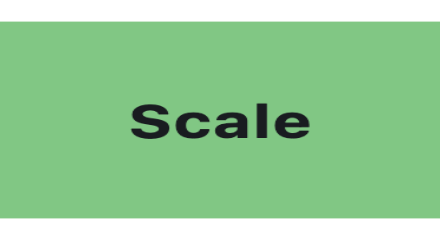
Scale#
import flet as ft


def main(page: ft.Page):
    page.horizontal_alignment = ft.CrossAxisAlignment.CENTER
    page.vertical_alignment = ft.MainAxisAlignment.CENTER
    page.add(
        ft.Container(
            width=220,
            height=120,
            bgcolor=ft.Colors.GREEN_300,
            border_radius=16,
            alignment=ft.Alignment.CENTER,
            content=ft.Text("Scale", size=28, weight=ft.FontWeight.BOLD),
            scale=ft.Scale(
                scale_x=1.18,
                scale_y=0.82,
                alignment=ft.Alignment.CENTER,
                filter_quality=ft.FilterQuality.MEDIUM,
            ),
        )
    )


if __name__ == "__main__":
    ft.run(main)
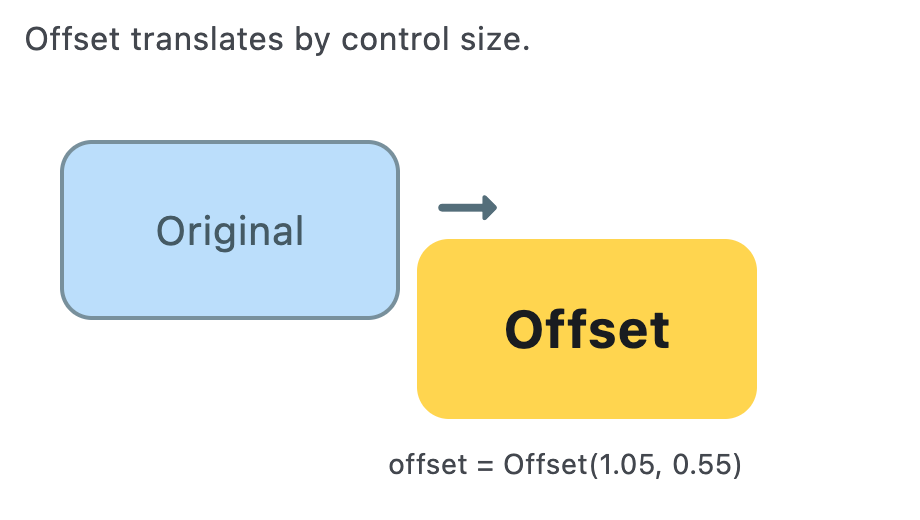
Offset#
import flet as ft


def main(page: ft.Page):
    page.horizontal_alignment = ft.CrossAxisAlignment.CENTER
    page.vertical_alignment = ft.MainAxisAlignment.CENTER
    page.add(
        ft.Stack(
            width=460,
            height=260,
            controls=[
                ft.Text(
                    "Offset translates by control size.",
                    left=12,
                    top=8,
                    size=16,
                    color=ft.Colors.ON_SURFACE_VARIANT,
                ),
                ft.Container(
                    left=30,
                    top=70,
                    width=170,
                    height=90,
                    border_radius=16,
                    bgcolor=ft.Colors.BLUE_100,
                    border=ft.Border.all(2, ft.Colors.BLUE_GREY_400),
                    alignment=ft.Alignment.CENTER,
                    content=ft.Text("Original", size=20, color=ft.Colors.BLUE_GREY_700),
                ),
                ft.Container(
                    left=30,
                    top=70,
                    width=170,
                    height=90,
                    border_radius=16,
                    bgcolor=ft.Colors.AMBER_300,
                    alignment=ft.Alignment.CENTER,
                    content=ft.Text("Offset", size=26, weight=ft.FontWeight.BOLD),
                    offset=ft.Offset(
                        x=1.05,
                        y=0.55,
                        filter_quality=ft.FilterQuality.MEDIUM,
                    ),
                ),
                ft.Icon(
                    ft.Icons.ARROW_RIGHT_ALT_ROUNDED,
                    left=212,
                    top=82,
                    size=44,
                    color=ft.Colors.BLUE_GREY_600,
                ),
                ft.Text(
                    "offset = Offset(1.05, 0.55)",
                    left=194,
                    top=222,
                    size=14,
                    color=ft.Colors.ON_SURFACE_VARIANT,
                ),
            ],
        )
    )


if __name__ == "__main__":
    ft.run(main)
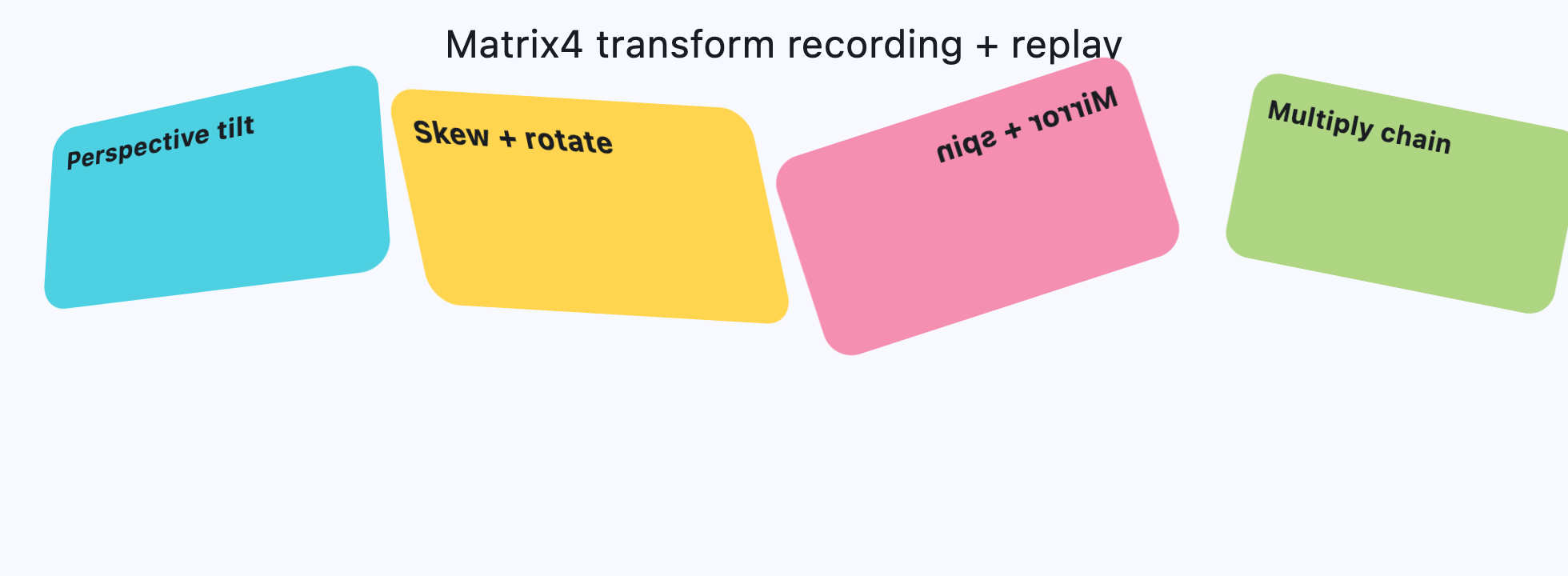
Matrix4 Transform#
from math import pi

import flet as ft


def card(title: str, color: str, matrix: ft.Matrix4) -> ft.Container:
    return ft.Container(
        width=220,
        height=130,
        border_radius=18,
        bgcolor=color,
        padding=12,
        content=ft.Text(title, size=18, weight=ft.FontWeight.BOLD),
        transform=ft.Transform(
            matrix=matrix,
            alignment=ft.Alignment.CENTER,
            filter_quality=ft.FilterQuality.MEDIUM,
        ),
    )


def main(page: ft.Page):
    page.horizontal_alignment = ft.CrossAxisAlignment.CENTER
    page.scroll = ft.ScrollMode.AUTO
    page.spacing = 20

    perspective_tilt = (
        ft.Matrix4.identity()
        .set_entry(3, 2, 0.0018)
        .rotate_x(-0.35)
        .rotate_y(0.45)
        .translate(0, -10, 0)
    )

    skew_and_rotate = ft.Matrix4.skew_y(0.28).rotate_z(-pi / 14)

    mirrored_spin = ft.Matrix4.diagonal3_values(-1, 1, 1).rotate_z(pi / 10)

    mix = ft.Matrix4.translation_values(24, -8, 0).multiply(
        ft.Matrix4.rotation_z(pi / 16).scale(0.9, 0.9)
    )

    page.add(
        ft.Text("Matrix4 transform recording + replay", size=24),
        ft.ResponsiveRow(
            controls=[
                ft.Container(
                    col={"sm": 6, "md": 3},
                    content=card(
                        "Perspective tilt",
                        ft.Colors.CYAN_300,
                        perspective_tilt,
                    ),
                ),
                ft.Container(
                    col={"sm": 6, "md": 3},
                    content=card(
                        "Skew + rotate",
                        ft.Colors.AMBER_300,
                        skew_and_rotate,
                    ),
                ),
                ft.Container(
                    col={"sm": 6, "md": 3},
                    content=card(
                        "Mirror + spin",
                        ft.Colors.PINK_200,
                        mirrored_spin,
                    ),
                ),
                ft.Container(
                    col={"sm": 6, "md": 3},
                    content=card("Multiply chain", ft.Colors.LIGHT_GREEN_300, mix),
                ),
            ]
        ),
    )


if __name__ == "__main__":
    ft.run(main)
Properties#
class-attribute
instance-attribute
#
align: Alignment | None = None
Alignment of the control within its parent.
class-attribute
instance-attribute
#
animate_align: AnimationValue | None = None
class-attribute
instance-attribute
#
animate_margin: AnimationValue | None = None
class-attribute
instance-attribute
#
animate_offset: AnimationValue | None = None
class-attribute
instance-attribute
#
animate_opacity: AnimationValue | None = None
class-attribute
instance-attribute
#
animate_position: AnimationValue | None = None
class-attribute
instance-attribute
#
animate_rotation: AnimationValue | None = None
class-attribute
instance-attribute
#
animate_scale: AnimationValue | None = None
class-attribute
instance-attribute
#
aspect_ratio: Number | None = None
The aspect ratio of the control. It is defined as the ratio of the width to the height.
class-attribute
instance-attribute
#
bottom: Number | None = None
The distance that the child's bottom edge is inset from the bottom of the stack.
Note
Effective only if this control is a descendant of one of the following:
Stack control, Page.overlay list.
class-attribute
instance-attribute
#
flip: Flip | None = None
Flips this control horizontally and/or vertically.
Set to an instance of Flip to mirror across x-axis, y-axis, or both.
class-attribute
instance-attribute
#
height: Number | None = None
Imposed Control height in virtual pixels.
class-attribute
instance-attribute
#
left: Number | None = None
The distance that the child's left edge is inset from the left of the stack.
Note
Effective only if this control is a descendant of one of the following:
Stack control, Page.overlay list.
class-attribute
instance-attribute
#
margin: MarginValue | None = None
Sets the margin of the control.
class-attribute
instance-attribute
#
offset: OffsetValue | None = None
Applies a translation transformation before painting the control.
The translation is expressed as an Offset scaled to the control's size.
So, Offset(x=0.25, y=0), for example, will result in a horizontal translation
of one quarter the width of this control.
Example
The following example displays container at 0, 0 top left corner of a stack
as transform applies -1 * 100, -1 * 100 (offset * control's size)
horizontal and vertical translations to the control:
```python
import flet as ft

def main(page: ft.Page):
    page.add(
        ft.Stack(
            width=1000,
            height=1000,
            controls=[
                ft.Container(
                    bgcolor=ft.Colors.RED,
                    width=100,
                    height=100,
                    left=100,
                    top=100,
                    offset=ft.Offset(-1, -1),
                )
            ],
        )
    )

ft.run(main)
```
class-attribute
instance-attribute
#
right: Number | None = None
The distance that the child's right edge is inset from the right of the stack.
Note
Effective only if this control is a descendant of one of the following:
Stack control, Page.overlay list.
class-attribute
instance-attribute
#
rotate: RotateValue | None = None
Transforms this control using a rotation around its center.
The value of rotate property could be one of the following types:
number- a rotation in clockwise radians. Full circle360°ismath.pi * 2radians,90°ispi / 2,45°ispi / 4, etc.Rotate- allows to specify rotationangleas well asalignment- the location of rotation center.
class-attribute
instance-attribute
#
scale: ScaleValue | None = None
Scales this control along the 2D plane. Default scale factor is 1.0, meaning no-scale.
Setting this property to 0.5, for example, makes this control twice smaller,
while 2.0 makes it twice larger.
Different scale multipliers can be specified for x and y axis, by setting
Control.scale property to an instance of Scale class.
Either scale or scale_x and scale_y could be specified, but not all of them.
class-attribute
instance-attribute
#
size_change_interval: int = 10
Sampling interval in milliseconds for on_size_change event.
Setting to 0 calls on_size_change immediately
on every change.
class-attribute
instance-attribute
#
top: Number | None = None
The distance that the child's top edge is inset from the top of the stack.
Note
Effective only if this control is a descendant of one of the following:
Stack control, Page.overlay list.
class-attribute
instance-attribute
#
width: Number | None = None
Imposed Control width in virtual pixels.
Events#
class-attribute
instance-attribute
#
on_animation_end: (
    ControlEventHandler[LayoutControl] | None
) = None
Called when animation completes.
Can be used to chain multiple animations.
The data property of the event handler argument contains the name
of the animation.
More information here.
class-attribute
instance-attribute
#
on_size_change: (
    EventHandler[LayoutSizeChangeEvent[LayoutControl]]
    | None
) = None
Called when the size of this control changes.
size_change_interval defines how often this event is called.