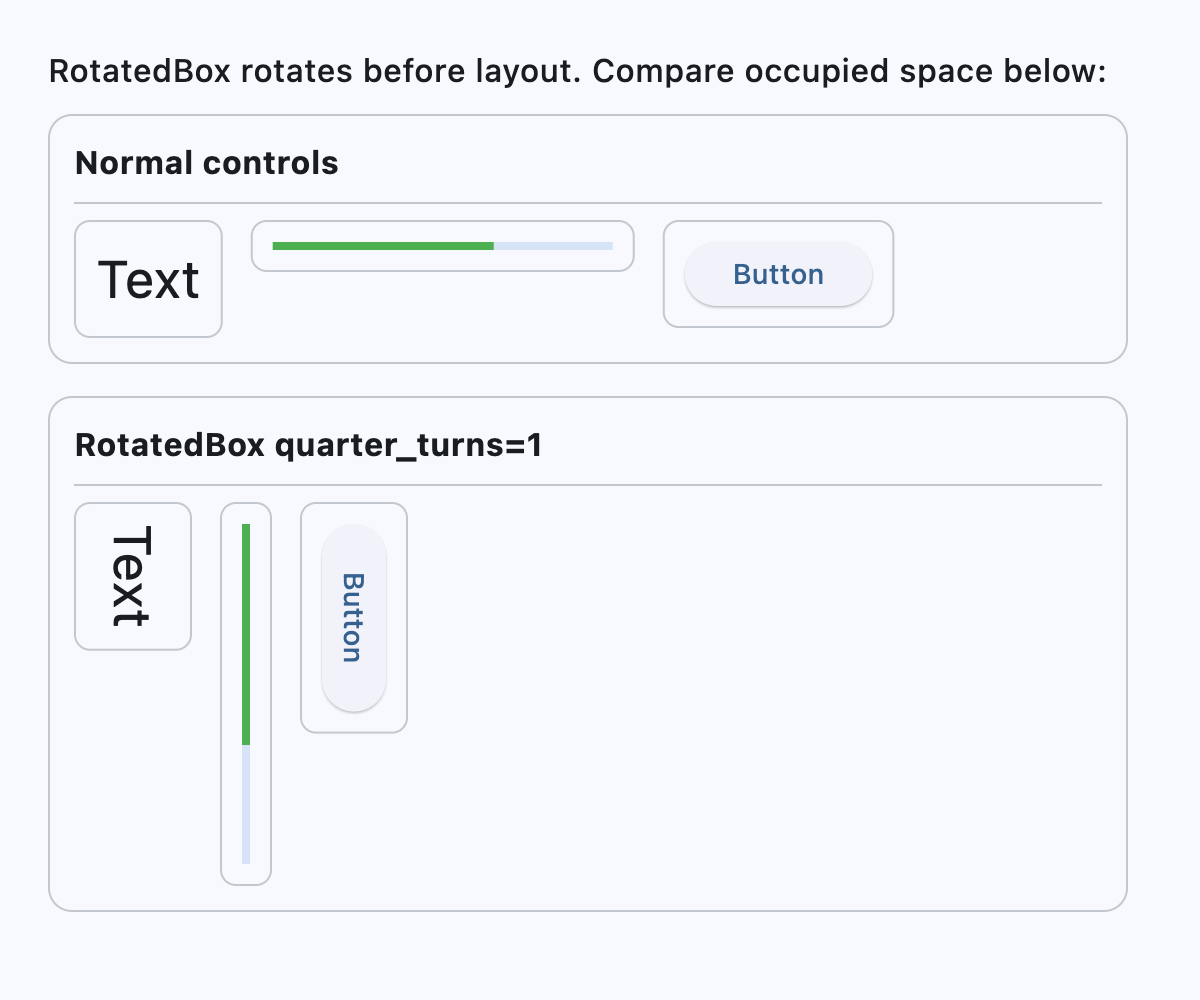
RotatedBox
Rotates its content by an integral number of quarter turns.
Unlike LayoutControl.rotate (which uses
Transform.rotate and applies the rotation only at paint time),
RotatedBox applies the rotation before layout. This means the control's
rotated dimensions participate in layout and can affect surrounding
controls.
Inherits: LayoutControl
Properties
-
content(Control | None) –The
Controlto rotate. -
quarter_turns(int) –The number of clockwise quarter turns.
Example#
import flet as ft


def _demo_control(content: ft.Control) -> ft.Container:
    return ft.Container(
        padding=10,
        border=ft.Border.all(1, ft.Colors.OUTLINE_VARIANT),
        border_radius=8,
        content=content,
    )


def _lane(title: str, controls: list[ft.Control]) -> ft.Container:
    return ft.Container(
        width=540,
        padding=12,
        border=ft.Border.all(1, ft.Colors.OUTLINE_VARIANT),
        border_radius=12,
        content=ft.Column(
            spacing=8,
            controls=[
                ft.Text(title, size=16, weight=ft.FontWeight.BOLD),
                ft.Divider(height=1),
                ft.Row(
                    spacing=14,
                    vertical_alignment=ft.CrossAxisAlignment.START,
                    controls=controls,
                ),
            ],
        ),
    )


def main(page: ft.Page):
    page.padding = 24
    page.scroll = ft.ScrollMode.AUTO
    page.add(
        ft.Text(
            "RotatedBox rotates before layout. Compare occupied space below:",
            size=16,
            weight=ft.FontWeight.W_500,
        ),
        ft.Column(
            spacing=16,
            controls=[
                _lane(
                    "Normal controls",
                    [
                        _demo_control(ft.Text("Text", size=26)),
                        _demo_control(
                            ft.ProgressBar(width=170, value=0.65, color=ft.Colors.GREEN)
                        ),
                        _demo_control(ft.Button("Button")),
                    ],
                ),
                _lane(
                    "RotatedBox quarter_turns=1",
                    [
                        _demo_control(
                            ft.RotatedBox(
                                quarter_turns=1,
                                content=ft.Text("Text", size=26),
                            )
                        ),
                        _demo_control(
                            ft.RotatedBox(
                                quarter_turns=1,
                                content=ft.ProgressBar(
                                    width=170, value=0.65, color=ft.Colors.GREEN
                                ),
                            )
                        ),
                        _demo_control(
                            ft.RotatedBox(
                                quarter_turns=1,
                                content=ft.Button("Button"),
                            )
                        ),
                    ],
                ),
            ],
        ),
    )


if __name__ == "__main__":
    ft.run(main)